Introduction
Most cyber attacks don’t start with malware, exploits, or stolen credentials.
They start with curiosity.
Before an attacker ever touches your systems, they try to understand you. Your organization, your infrastructure, your people, and your habits. That early stage of intelligence gathering is known as cybersecurity footprinting, and it quietly decides how easy or hard the rest of the attack will be.
For defenders, footprinting is often overlooked because it doesn’t feel dangerous. There is no alert, no breach, no visible damage. But in reality, footprinting is what turns random attackers into informed ones.
This blog explains footprinting in a practical, human way. What it is, how it works, why attackers rely on it, and what organizations can realistically do to reduce the risk.
What Is Cybersecurity Footprinting?
Footprinting is the process of collecting information about a target organization and its systems.
The goal is simple: build a clear picture before taking action.
Attackers and penetration testers use footprinting to understand:
- What systems exist
- How they are connected
- What technologies are in use
- Who works there
- Where mistakes or weak points might exist
Think of footprinting like researching a neighborhood before buying a house or planning a visit. You look at maps, reviews, traffic patterns, and nearby facilities. You’re not breaking in. You’re learning.
In cybersecurity, that learning phase is often the most important one.
By the time an actual attack happens, most of the hard thinking is already done.
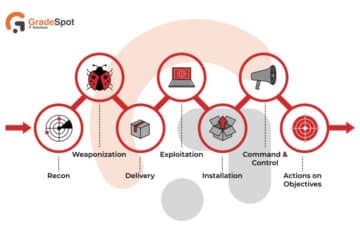
Footprinting, or reconnaissance, is the initial stage in cybersecurity where attackers or ethical hackers gather extensive information about a target system (networks, servers, users, security policies) to find vulnerabilities, creating a detailed map before a potential attack or security assessment. It involves both passive (OSINT, website checks) and active (port scanning) methods, helping to identify weak points like open ports, outdated operating systems, or employee contact info for social engineering.
Why Footprinting Is the First Step in Almost Every Attack
Successful attacks are rarely random.
Attackers don’t usually guess passwords blindly or scan every system equally. They prioritize. They choose targets that look exposed, outdated, or poorly defended.
Footprinting helps them do exactly that.
Through footprinting, attackers can:
- Identify internet-facing systems
- Spot outdated technologies
- Discover naming patterns and email formats
- Learn how teams and roles are structured
- Find clues that help them blend in
For penetration testers and red teams, the same process is used for ethical reasons. The goal is to test how much information an organization leaks and how that information could be misused.
In both cases, the principle is the same: the more you know, the less you need to guess.
The Two Core Types of Footprinting
Footprinting generally falls into two categories: passive and active. Understanding the difference helps defenders know what can be prevented and what must be managed.
Passive Footprinting
Passive footprinting means gathering information without directly interacting with the target’s systems.
No scans. No probes. No traffic sent to the organization.
Everything comes from publicly available or already indexed sources.
Common examples of passive footprinting include:
- Searching company names on Google
- Reviewing LinkedIn profiles of employees
- Reading job descriptions and hiring posts
- Downloading public PDFs or documents
- Browsing public code repositories
- Looking at archived data or cached pages
This type of footprinting is difficult to detect because the organization is not being touched at all. Attackers are simply observing what the organization has already made public.
From a defender’s point of view, this is dangerous because:
- Firewalls can’t stop it
- Antivirus can’t detect it
- Logs won’t show it
Once information is public, it’s out of your control.
Active Footprinting
Active footprinting involves direct interaction with the target’s infrastructure.
This means sending requests, packets, or queries that may show up in logs or alerts.
Examples include:
- Scanning for open ports
- Querying DNS records
- Mapping network routes
- Checking service banners
- Identifying running services
Active footprinting is usually more accurate but also riskier for attackers. It can leave traces and trigger detection systems.
This is where good monitoring and logging can make a difference.
In real-world attacks, passive footprinting often comes first, followed by carefully planned active footprinting once the attacker knows where to look.
Master SOC Analysis
Are you passionate about cybersecurity and ready to build a career as a SOC Analyst? Look no further!
GradeSpot IT Solutions in Hyderabad offers expert-led training designed to make you industry-ready.
Common Footprinting Techniques Explained with Real Examples
Footprinting is not a single action. It’s a collection of techniques that together form a detailed profile of the target.
Let’s walk through the most common ones.
Footprinting Through Search Engines
Search engines are one of the most powerful reconnaissance tools available.
Attackers use them to uncover information that organizations never meant to expose.
This can include:
- Backup files left on web servers
- Configuration files
- Admin or login pages
- Error messages revealing internal details
- Sensitive documents indexed by mistake
A simple search can sometimes reveal:
- Internal IP addresses inside PDFs
- Software versions in error pages
- File paths embedded in URLs
What makes this dangerous is that search engines do the hard work for attackers by indexing and organizing data.
If something is searchable, it is discoverable.
Footprinting Through Online Platforms and Web Services
Organizations leave digital footprints across many platforms, often without realizing it.
These platforms may include:
- Company registration portals
- Financial or compliance websites
- Vendor and partner listings
- Job portals and career pages
- Public APIs and developer portals
Individually, each source seems harmless. Combined, they can reveal:
- Business structure
- Technology preferences
- Security maturity
- Internal terminology
- Third-party dependencies
Attackers use this information to make their attacks feel legitimate and targeted.
Footprinting Through Social Media
Social media is a goldmine for footprinting.
Employees often share information casually, without realizing how it can be misused.
This may include:
- Job roles and responsibilities
- Team names and internal tools
- Office locations and travel plans
- Work schedules and shift timings
- Project updates or achievements
Attackers can use this to:
- Identify high-value targets
- Craft convincing phishing messages
- Impersonate internal staff
- Time attacks during holidays or off-hours
This is why security awareness is just as important as technical controls.
Website and Application Footprinting
A public-facing website can reveal more than most people expect.
By analyzing a website carefully, attackers can learn:
- Hosting providers and IP addresses
- Web server and application types
- URL structures and parameters
- Hidden directories and files
- Error handling behavior
Even small details like:
- Default error pages
- Stack traces
- Unusual redirects
can give away valuable clues about the underlying system.
For attackers, this helps narrow down potential weaknesses. For defenders, it highlights the importance of consistent configuration and secure error handling.
Email Footprinting
Emails contain technical information beneath the surface.
By examining email headers and behavior, attackers can identify:
- Mail servers and gateways
- Routing paths
- Sender IP addresses
- Security filtering tools
- Client operating systems and browsers
This information is often used to:
- Improve phishing success rates
- Bypass email filters
- Spoof trusted senders
Email security tools help, but awareness and monitoring are critical.
WHOIS and DNS Footprinting
WHOIS and DNS records provide foundational information about domains and networks.
From these records, attackers can gather:
- Domain ownership details
- Registration and expiry dates
- Name servers and mail servers
- Network ranges associated with the organization
DNS enumeration can also expose:
- Subdomains
- Legacy systems
- Test or staging environments
- Internal naming patterns
Poorly managed DNS records are a common source of unintended exposure.
Network Footprinting
Network footprinting focuses on understanding how systems are connected.
Using routing and IP information, attackers can:
- Map network topology
- Identify gateways and firewalls
- Spot segmentation gaps
- Locate externally exposed services
This information often feeds directly into scanning and exploitation phases.
Footprinting Through Social Engineering
Not all footprinting is technical.
Simple human interactions can reveal valuable information.
Examples include:
- Casual phone calls posing as support staff
- Observing office environments
- Asking harmless-looking questions
- Impersonating vendors or partners
These techniques work because people are often helpful by default.
Strong processes and awareness reduce this risk significantly.
The Typical Stages of a Footprinting Process
Whether ethical or malicious, footprinting usually follows a structured flow.
Stage 1: Target Identification
The first step is defining what to look at.
This may involve:
- Identifying domains and IP ranges
- Finding subsidiaries and related entities
- Mapping internet-facing assets
Clear scope helps avoid noise and detection.
Stage 2: Information Gathering
This is where most of the work happens.
Information collected may include:
- IP addresses and services
- Software and technologies
- Usernames and email formats
- Network structure
- Publicly available data
The focus is on collecting as much relevant data as possible.
Stage 3: Analysis and Correlation
Raw data is analyzed to find patterns and weaknesses.
This includes:
- Comparing versions against known vulnerabilities
- Identifying misconfigurations
- Spotting inconsistent security controls
- Prioritizing likely attack paths
This stage turns information into insight.
Stage 3: Analysis and Correlation
Raw data is analyzed to find patterns and weaknesses.
This includes:
- Comparing versions against known vulnerabilities
- Identifying misconfigurations
- Spotting inconsistent security controls
- Prioritizing likely attack paths
This stage turns information into insight.
Stage 4: Attack Planning
For attackers, this is where decisions are made.
For defenders and testers, this stage informs:
- Risk prioritization
- Remediation planning
- Security improvements
At this point, the groundwork is complete.
How Organizations Can Reduce Footprinting Risk
You cannot completely stop footprinting. But you can reduce how useful it is.
Here are practical steps that work.
- Review what information is publicly available
- Remove sensitive metadata from documents
- Limit technical details in job postings
- Secure DNS and domain records
- Monitor unusual scanning and lookup behavior
- Train employees on oversharing risks
- Perform regular external security assessments
- Treat reconnaissance findings seriously, not as low-risk noise
Security is not just about blocking attacks. It’s about controlling what attackers can learn before they try.
Final Thoughts: Why Footprinting Deserves More Attention
Footprinting is quiet, patient, and powerful.
It doesn’t trigger alarms. It doesn’t look like an attack. And that’s exactly why it works.
Organizations that focus only on exploits and malware often miss the bigger picture. By the time an alert fires, the attacker already knows where to go.
Understanding footprinting changes how you think about security. It shifts the focus from reacting to incidents to reducing exposure before incidents happen.
If you control what the outside world can learn about you, you make every attack harder before it even begins.
That’s the real value of understanding cybersecurity footprinting.